
AdsPower and a static proxy handle two different parts of a browser workflow. The browser profile organizes session data and configuration. The proxy supplies the network exit for traffic routed through it. Used deliberately, they can make an authorized social account easier to operate consistently.
This is a setup guide for account owners and properly authorized teams. It is not a method for avoiding an identity check, replacing an appeal, or hiding prohibited activity. No browser can guarantee that an account will never be challenged.
Begin with a clear requirement: one named workflow, controlled access, a persistent profile, and a connection whose behavior you can verify. If an ordinary browser profile already satisfies your needs, specialized software is optional.
Check ownership and permissions first
Identify the person or business that owns the account and the assets being managed. Confirm which operators are authorized to publish, respond to messages, or manage advertising. Use the platform's native business permissions where available rather than treating a shared session as permission.
Record the recovery owner and a backup contact. The person who can open the browser may not control the connected email or phone number. That distinction matters when a security challenge appears while the owner is on a flight or has lost their device.
Do not import purchased session cookies or profiles supplied by strangers. You cannot establish legitimate ownership merely because an account opens without a password. Start with accounts you control and a documented access arrangement you can explain to the rightful owner.
Gather the connection information privately
Obtain the proxy protocol, hostname, port, and required authentication details from your provider's current instructions. Confirm that the service is static for the period you need. Check whether the exit is dedicated or shared, and whether renewal preserves the assignment.
Store credentials in a secure password manager. Profile names, task boards, screenshots, and general team documents should not contain secrets. When requesting support, describe the error and configuration type first; avoid sending an unredacted screen that exposes working credentials.
BadAssProxy's static residential service page explains available options, while the proxy connection guide covers the information to verify. Product availability can change, so use the live ordering details rather than assuming an article guarantees a particular country or term.
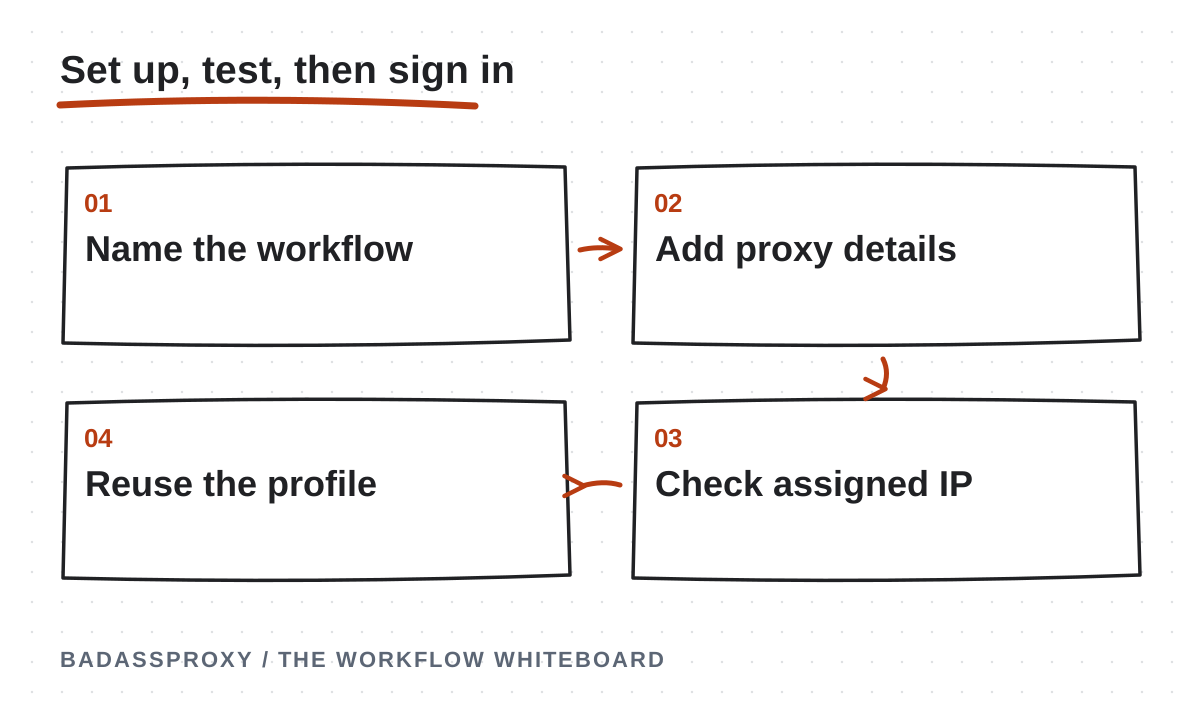
Create a clearly named persistent profile
In AdsPower, create a profile for the authorized business workflow. Choose a name that identifies the client or brand without including a password, private recovery address, or identity document number. A consistent naming system helps prevent operators from opening the wrong workspace.
Decide who can access the profile and how handovers will work. For a solo creator, that may be straightforward. For an agency, record the owner, assigned operators, and process for removing access when someone leaves. Match the controls to the sensitivity of the account.
Keep software current and use supported configuration options. Do not randomly modify browser characteristics to imitate another person or evade an enforcement decision. The useful objective is a coherent working environment, not a collection of settings selected because someone advertised them as undetectable.
Add the proxy using current documentation
The official proxy configuration documentation describes creating a profile, choosing the proxy type, entering connection fields, and using the connection check. Interface labels can change, so follow that current reference alongside the provider's protocol instructions.
Enter the host and port accurately, then provide authentication if required. Select the protocol the service actually supports; changing a dropdown does not convert the provider into a different protocol. Save the configuration only after resolving basic connection errors.
If your goal is a static assignment, avoid adding rotation controls or change-address URLs unless the product specifically requires them for another legitimate purpose. A working rotating service is still the wrong configuration when the requirement was to reuse the same exit.
Test the route before account access
Use the built-in connection check, then open the profile and inspect the reported external address. Compare it with the provider's assignment. An approximate city label may differ between databases, so distinguish an actual address mismatch from a geolocation disagreement.
Close and reopen the profile and check again. If practical, move between a trusted Wi-Fi connection and your personal hotspot while keeping the same profile configuration. The exit should behave according to the service you purchased, even though underlying connectivity changes.
A successful proxy test proves that a connection was established. It does not prove that Instagram will accept the login, that the address has a particular reputation, or that every application on the computer uses that route. Keep those claims separate in your team documentation.
Sign in through the genuine platform
Navigate directly to the platform using a trusted address or bookmark. Confirm the intended account before making changes. Complete legitimate verification through the official interface, and keep recovery codes private. Do not send codes to a person claiming they can complete setup for you.
If a suspension or disabled-account notice appears, stop treating the task as proxy troubleshooting. Use the official review route. If account details changed unexpectedly, follow compromised-account recovery. Our Vietnam access diagnosis guide explains how to distinguish these cases.
Once signed in, verify the correct business assets and permissions. Do not publish a test post or spend advertising money merely to prove the browser opens. A non-destructive review of the intended workspace is normally enough to establish that the operator reached the right account.
Preserve sessions without sacrificing security
Reuse the profile instead of creating a new one for every work session. Avoid deleting storage without a reason, because that can sign you out and remove useful continuity. However, persistence is an operational convenience, not a reason to retain a potentially compromised session.
Keep the operating system, browser software, and necessary extensions updated. Remove extensions you do not trust or need. If a device or profile is compromised, revoke sessions and rebuild the environment as appropriate, even when doing so interrupts the usual workflow.
Treat profile exports and backups as sensitive access material. Restrict their storage and sharing. A copy of browser data can be more consequential than a screenshot of the account because authenticated sessions may allow actions without another password prompt.
Document a safe team handover
Create a short operating note that identifies the profile, purpose, owner, assigned proxy service, and renewal responsibility. Include where authorized operators find instructions and how they request help. Reference the password manager rather than embedding secrets in the note.
Agree who responds to a verification challenge. Avoid a process where several people reset credentials or request codes simultaneously. A designated incident lead can collect the exact message, coordinate the owner, and stop unrelated changes while the issue is diagnosed.
Use platform-native roles wherever possible and review them after staffing changes. Removing a person's browser workspace permission may not remove their separate platform role, and revoking a platform role may not remove a local profile copy. Access removal needs to cover both layers.
Troubleshoot one layer at a time
If the profile cannot connect, check basic internet access, subscription status, protocol, host, port, and authentication. Do not delete the profile immediately. A wrong port or expired service is a connection issue, not evidence that the browser environment needs to be rebuilt.
If the proxy works but the website fails, note the exact response and test a neutral page through the same profile. Check provider status and application documentation. Preserve evidence of the failure without exposing credentials, personal messages, or unrelated customer information.
If the website opens but the account is challenged, follow the platform's instructions. Changing endpoints repeatedly cannot establish ownership. Our static IP explanation and browser-profile terminology guide help identify which component controls which behavior.
Keep a short written acceptance note after setup: profile name, assigned service, date tested, expected exit, and person responsible for renewal. Record whether the profile reopened successfully and whether a second underlying network preserved the intended route. Do not include the password or session export. Have another authorized operator read the note and identify the correct workspace without opening unrelated accounts. If they cannot, improve the naming and instructions before delegating live work. This simple handover rehearsal tests the organization of the setup, which is often the reason for using a managed browser in the first place.
Review the setup after real use
After several normal work sessions, ask whether the assigned exit stayed consistent, the profile reopened correctly, and the team understood the handover. Record unexpected failures and useful resolutions. These observations are better acceptance criteria than the vague claim that an account now looks more trustworthy.

Before travel, complete the digital nomad security checklist and confirm your recovery options. Revisit the Vietnam stability overview when planning a relocation. A profile and proxy should support those security preparations rather than distract from them.
For a workflow that genuinely needs both components, pair a persistent AdsPower profile with a suitable BadAssProxy static address. Keep authorization, recovery, and maintenance explicit. A successful setup is one the rightful owner can operate, explain, and recover when something changes.
Define the workspace before entering connection details
Give the browser profile a purpose that an authorised colleague can understand. Use the client or business asset, the intended role and a clear operational label. Avoid naming profiles only by an address or a temporary employee nickname. A profile should remain identifiable when the connection is renewed or another approved operator takes over the work.
Write down which legitimate account or business asset belongs in the workspace. Confirm that the operator has the required platform permissions and that the owner retains recovery authority. Browser organisation helps reduce mistakes, but it does not grant permission to use an asset. Resolve unclear ownership before making the profile part of a daily client workflow.
Identify the normal device and the scope of the proxy setting. This guide concerns traffic configured through the browser workspace. A phone's native application or another browser may follow a different route. Include that distinction in the setup note so a later address check is performed in the right environment.
Agree on a small acceptance test. The profile should open, the configured connection should pass an appropriate check, the observed route should match the purchased service and the authorised operator should complete the necessary task. Keep account verification separate: if the genuine platform requests it, the owner must follow the official process rather than treating the prompt as a failed proxy purchase.
Collect the right configuration information
Use the connection details supplied for the actual service you purchased. Record the supported protocol, hostname or address, port and authentication method. Do not substitute a port from a tutorial or assume that every provider uses the same defaults. The combination must match the provider's supported configuration and the browser's current options.
Treat authentication material as a secret. Retrieve it from the approved credential store when needed, and avoid copying it into a general setup document. A screenshot used for support should hide passwords and other sensitive values. The document can point to the credential record without becoming a second, less controlled copy of it.
Check whether the service relies on an additional access condition, such as an approved source address, when that is part of the provider's product. If so, understand how travel affects that condition before departure. Do not assume that a successful setup on one local network establishes that authentication will work identically from every future connection.
Keep the purchase reference and provider support path beside the operational record. These details help an authorised person distinguish the current service from an expired test subscription. A clean record also prevents the common mistake of updating one endpoint while the working browser still uses another saved profile.
Use current documentation for changing interface labels
Browser applications evolve, and a screenshot from an older version may not match the controls currently visible. Follow the current AdsPower proxy-type documentation for supported configuration options. This article explains the operating process; it should not be treated as a promise that every label or menu position remains unchanged.
Read the protocol choices carefully. Select the option that matches the service supplied by your provider. Similar-looking fields can represent different parts of the connection, so enter each value deliberately. If you are uncertain whether a value is an endpoint, port or credential, clarify it before opening the account's working session.
Save the intended configuration in the correct profile and confirm that you open that profile for the test. Several similarly named workspaces can make a correct configuration appear broken when the wrong window is used. A clear profile label and a brief check of the active workspace solve that organisational problem more effectively than repeated credential changes.
If the current interface differs materially from the documentation, consult the application's support information. Avoid improvising an unsupported transfer or editing internal files simply to match an old tutorial. The maintained setup should remain understandable to the next authorised operator and compatible with the application's supported workflow.
Run the connection check before account work
Begin with the application's available connection test where appropriate. Record whether it succeeds and any non-secret error text. A failed test is a reason to investigate the connection details, authentication or network path before attempting sensitive account actions. There is no benefit in repeatedly signing into an account through an environment that cannot complete a basic connection check.
Open an ordinary public page from the configured workspace and inspect the observed exit using an appropriate address-checking service. Compare that observation with the provider's assignment information. Make sure the check occurs inside the intended profile. Testing from a different browser can produce a perfectly valid result for the wrong route.
If the result is unexpected, review the saved settings and the actual service record. Look for a mistyped endpoint, a mismatched protocol, an expired subscription or an overlooked access condition. Record one change and one result at a time. The goal is to identify the cause, not to produce a long list of unrelated configuration experiments.
Once the connection behaves as expected, record the application, profile, time and result. Keep the note concise enough to use during a later handover. The test establishes the routing behaviour that was observed. It does not prove account ownership, guarantee platform acceptance or remove the need to respond to an official verification request.
Establish the authorised account session
Use the genuine platform and the access method approved for the account. Confirm the intended business asset before performing work. A correctly routed browser can still contain the wrong account if an operator opens a familiar-looking page without checking its identity. Profile naming and native business permissions should support each other.
Complete any required verification through the official process. Keep codes with the person authorised to use them, and do not add them to the setup note. If the owner cannot access the requested recovery method, treat that as an account dependency. A proxy configuration change is not a substitute for the owner's verification.
After access is established, perform the ordinary task needed for acceptance without unnecessary live changes. For example, confirm that the authorised workspace and required business asset are available. Do not alter campaigns, contact information or security settings merely to prove that the browser works. Choose a check proportionate to the legitimate purpose of the setup.
Record the outcome and any remaining limitation. A connection can be working while a particular business permission is missing. Keep those results separate so the next operator understands what is complete and who must act next. Clear completion criteria make the setup more useful than a broad statement that the account is “safe now.”
Preserve useful state while keeping software current
A persistent workspace is valuable because the team can return to an organised environment. Preserve the profile through the application's supported processes, and avoid routine deletion of its working state without a reason. If a particular issue requires clearing data or recreating a profile, document the purpose and consider the effect on legitimate access first.
Persistence does not mean avoiding security updates. Maintain the browser application and operating system through supported update procedures. Schedule changes when the operator can verify the normal workflow afterward. Keep a brief record of significant updates so a later investigation can distinguish a software change from a connection or account change.
Treat stored sessions as sensitive information. An active browser environment may provide access to business assets even when a password is not visible. Limit access to approved people and devices. Do not export or transfer profile data through an uncontrolled shared folder simply because it looks like an ordinary application file.
If a device is lost or appears compromised, prioritise the account's security and official recovery process. Preserving the old session is not the overriding goal when its trust is in question. Use a trusted environment, involve the legitimate owner and review relevant access controls. Document the response without exposing recovery secrets in the incident record.

Build a repeatable daily opening routine
Start by identifying the task and the account involved. Open the corresponding labelled workspace and confirm the visible business asset before making changes. This small habit helps prevent a common operational failure: carrying out a legitimate action in the wrong client's account. A proxy cannot detect that mistake on the operator's behalf.
Check the connection when there is a reason to doubt it, after a relevant configuration change or as part of the team's agreed routine. Record actual failures instead of repeatedly changing settings in anticipation of problems. The operating process should be calm enough that people can distinguish a meaningful change from ordinary daily use.
Use approved native permissions for the task. Keep the account owner's recovery responsibilities separate from routine contractor work. If the platform asks for a verification action outside the operator's authority, stop at that dependency and involve the owner. Do not turn the browser workspace into a reason to bypass the organisation's access process.
At the end of the work period, follow the team's agreed handling of the device and profile. Protect the workstation physically, keep task notes in the appropriate system and record any unresolved issue. A useful handover explains the next action without requiring the next person to infer it from a collection of open tabs.
Troubleshoot authentication errors methodically
First identify which system is requesting authentication. A proxy authentication prompt concerns the connection service, while an Instagram login or verification prompt concerns the platform account. Similar timing does not make them the same problem. Record the wording and the point in the workflow where it appears.
For a connection-service issue, confirm the active subscription and the provider-supplied credentials in the approved store. Check that the correct authentication method is configured. Avoid repeatedly copying old values from a chat history. If a credential was rotated, make sure the intended profile has been updated and that obsolete instructions are removed.
For an account prompt, use the genuine platform's process and involve the owner where required. Do not give a proxy support representative the social account's password or recovery code. The provider can investigate its endpoint and authentication service without taking control of the business account.
When the issue is resolved, record the confirmed cause if one was established and the verified result. If support restored service without identifying a cause, say so. Do not convert a guess into a technical explanation simply because the final test succeeded. Accurate notes are more useful during the next incident than an unsupported story about what must have happened.
Investigate an unexpected exit address
Repeat the observation from the intended profile and confirm that the correct window is active. Compare the saved connection details with the current provider assignment. A different browser, an old profile or a recently replaced service can explain a mismatch without implying an account-security event. Investigate the routing evidence before changing account settings.
Check whether another routing tool is part of the device's configuration. A VPN and a browser proxy can coexist, but the resulting path needs to be understood from the actual settings and observations. Document both tools when contacting support. Do not assume that their order or scope is obvious from the icons visible on the device.
Distinguish an address mismatch from a geolocation-label mismatch. Two lookup services may describe an address differently, and a city estimate is not a precise physical locator. The travel location guide explains how to interpret that distinction. Keep the observed address and the location label as separate fields in the diagnostic note.
If the provider confirms an assignment change, update the operational record and verify the affected workflow. If the observation remains unexplained, retain the evidence and use the support path. A clear unresolved task is preferable to cycling through unrelated countries or rebuilding profiles until the original configuration is no longer recognisable.
Prepare a handover for another authorised operator
The handover should identify the business owner, the operator's role, the workspace label and the approved credential reference. Explain what the profile is used for and which applications are outside its routing scope. A colleague should be able to identify the correct environment without opening several accounts and guessing from their contents.
Use native business permissions and supported application access controls where appropriate. Do not make a copied session the sole basis for another person's authority. The receiving operator must have legitimate permission to perform the work. Keep recovery control with the correct owner and document any approval needed for future changes.
Include the latest acceptance-check result and the normal support path. State who maintains the proxy subscription and who can respond when the main operator is unavailable. A handover should transfer understanding of the process, not merely a collection of secret values with no explanation of their purpose.
Ask the receiving operator to explain the next task and the escalation path back to you. If they cannot identify the correct workspace or responsible owner, improve the note before relying on the handover. This simple review can expose ambiguity that would otherwise appear during a deadline, when it is more difficult to resolve calmly.
Plan a replacement laptop without improvising access
Start with the supported procedures for the browser application and the organisation's device policy. Identify what can be transferred, what must be configured again and what requires the account owner's participation. Do not assume that copying a directory creates an equivalent trusted environment or preserves every setting safely.
Prepare the replacement device with current software and the approved credential access. Recreate or transfer the workspace only through the supported process, then verify the connection before account work. Keep the old device secure while it remains part of the transition. If the old device is compromised, follow the incident process instead of treating it as a routine migration source.
Confirm legitimate account access on the new device through the official platform. A verification request may require the owner's action even when the browser configuration is correct. Record that dependency accurately. Avoid changing the connection repeatedly in an attempt to make an ownership check disappear.
After the transition, update the device inventory and remove access from the old environment according to the organisation's process. Confirm who now maintains the workspace and where the current instructions live. A replacement is complete when the new working arrangement is understood and the old one is no longer an undocumented source of access.
An illustrative setup record
A small agency might record a workspace as follows: the client owns the business asset, an approved operator has the required role, the profile is labelled for that client and the proxy credentials are referenced in the agency's protected store. The record identifies the purchased service and renewal owner without including the password itself.
The setup note then records the protocol selected from the provider's instructions, the application used for the check and the observed exit. The operator confirms the intended business asset through the genuine platform and notes any remaining permission dependency. No claim is made that the connection grants access or guarantees future platform decisions.
During a later network change, the operator compares the actual observation with this record. If the route behaves as expected, they continue the authorised task. If it does not, they have enough information to report a connection issue without reconstructing the original purchase from old messages. The record supports diagnosis because it describes a real test and a real responsibility.
This is an illustrative operating example, not a customer outcome or a required product configuration. Adapt the fields to your own organisation and the current software. The essential qualities are a clear purpose, protected secrets, legitimate permissions and a result that another authorised person can understand.

Questions about the browser and static proxy combination
Does each profile need a separately purchased address?
Start with the legitimate workflow and the provider's actual terms. There is no universal rule in this article assigning one address to every account or profile. Evaluate scope, isolation, service limits and operational clarity. Do not use a product arrangement as a substitute for platform permissions or as a claim that an account will avoid review.
Can I change the proxy without changing the profile?
The application supports proxy configuration within its profile workflow, but use its current documentation for the specific change. Record the reason, confirm the new provider details and test the intended route. Preserve legitimate ownership and recovery throughout the change. A successful routing update does not establish anything about an unrelated account restriction.
Should I disable updates to keep the environment consistent?
No operating routine should depend on ignoring relevant security maintenance. Follow supported update procedures and verify the normal workflow afterward. Consistency means understanding the environment and documenting meaningful changes, not freezing software indefinitely. If an update causes a problem, investigate the observed issue and use the vendor's support process.
What belongs in a setup screenshot?
Only the information needed to explain the issue. Hide passwords, tokens, recovery details and unrelated client information before sharing. Prefer a concise written description when a screenshot would expose more than the recipient needs. Keep sensitive material in the approved support or evidence location rather than distributing copies across general chat channels.
What if the connection works but the account does not?
Read the platform's exact notice and follow the appropriate official process. Record the connection test as complete while keeping the account task open. The account interruption guide separates verification, compromise, enforcement and technical failures. Changing a working proxy is not automatically the next useful step.
When should the setup be reviewed again?
Review after a significant device, operator, provider or account change, and when the team finds the instructions difficult to follow. Renewal is also a useful opportunity to confirm the service remains necessary. Keep the review proportionate: update the facts that changed, verify the relevant workflow and remove obsolete instructions.
A troubleshooting worksheet for the saved profile
Keep a short worksheet beside the supported setup instructions. Begin with the profile label, authorised business purpose and current device. Add the non-secret connection reference and the date of the last relevant check. The worksheet should help another approved operator identify the environment without opening several client accounts to see which one looks familiar.
Record the first failing step precisely. Did the application fail to open the profile, did the proxy check fail, did a public page fail to load, or did the genuine platform request verification? These observations point to different responsibilities. A single statement such as “AdsPower is not working” gives support much less information than the exact step and visible error.
Add the current service state where it is relevant. Confirm the purchased product and whether the provider has supplied updated configuration details. Keep credentials in their designated protected store. If authentication changed, update the intended profile through the supported interface and remove obsolete instructions. Avoid copying values from a screenshot whose date or service is unclear.
Write down one action and one result for each useful test. For example, a corrected protocol followed by a successful connection check establishes a specific configuration result. It does not establish why a separate platform prompt appeared. Keep those conclusions narrow so the next person can build on the evidence without repeating unrelated experiments.
When the browser and route work, mark that part of the task complete. If a business permission or owner verification remains unresolved, name that dependency separately. A precise waiting status is more useful than repeatedly rebuilding a working profile while the person authorised to complete the next action is unavailable.
Review the first handover after setup
Ask the receiving operator to locate the intended profile and explain its purpose before starting work. They should identify the client asset, their approved role and the person responsible for recovery. If any of those details are uncertain, clarify them through the legitimate owner rather than relying on whatever session happens to be open.
Have the operator explain the connection scope. They should know whether the proxy applies to this browser workspace and whether other applications use separate routes. If they perform an address check, it should run in the intended environment. This catches a common source of false troubleshooting conclusions: testing a different browser and assuming the configured profile failed.
Next, ask them to identify the support path for an application error, connection error and account notice. The answers should lead to the appropriate vendor, provider or owner. They should not involve sending passwords or recovery codes to a general chat. The handover is strongest when it transfers a usable process with clear limits.
Finally, confirm the next authorised task and its completion criteria. The operator should know what result to record and which actions require additional approval. This connects the technical setup to the business work it exists to support. A well-organised profile is useful because an authorised person can operate it accurately, maintain it responsibly and report a real problem with enough detail for the right person to help.
Review that handover after the first ordinary work session and correct any instruction that caused uncertainty about the profile, connection or responsible owner.