
Moving to Vietnam can change almost everything around a familiar social account: your network, working hours, phone number, browser, and recovery routine. If Instagram then asks you to verify a login, the timing makes the country an obvious suspect. Timing alone, however, does not establish the cause.
There is no published Meta rule saying ordinary travelers are banned simply for moving to Vietnam. A security challenge, a compromised account, and a policy suspension also require different responses. The useful goal is to understand the message, secure ownership, and reduce changes you do not need.
A persistent browser profile and a static IP can support that last goal. They keep selected parts of your working environment consistent. They cannot promise uninterrupted access, reverse enforcement, or establish that the person operating an account owns it.
Start with the account, not the country
Imagine a photographer relocating from London to Da Nang. She keeps her existing laptop but uses airport Wi-Fi, a hotel network, a local SIM, and three VPN locations during her first week. She also replaces her recovery number because the old SIM stops receiving messages.
If a challenge appears, several explanations remain possible. The account could need routine verification, the browser session could have expired, an unfamiliar device could have attempted access, or a separate policy issue could exist. Calling every interruption an “Instagram banned Vietnam” problem hides those differences.
Read the exact notice before buying anything. If access is explicitly suspended or disabled, follow the review instructions in the official app. If details changed without permission, use the compromised-account process. Our Vietnam login diagnosis guide explains how to separate those situations.
What continuity actually means
A password is one part of access. A working session also involves browser storage, server-side session records, network routing, and the account's security settings. Meta publicly describes alerts for unfamiliar devices or browsers, but does not disclose a formula that lets a provider calculate your suspension risk. See its security guidance.
Continuity means reusing an environment you control and understand. It does not mean freezing an old browser version, refusing security updates, or pretending your business has never moved. Necessary changes should still happen. The aim is to avoid unnecessary resets that make your own troubleshooting harder.
A useful question is: “What changed immediately before this problem?” If the answer contains six unrelated changes, your first improvement is a clearer workflow and a small change log, not another tool promising invisibility.
Hold the network exit steady
Your laptop's local Wi-Fi address is different from the public address an internet service sees. A static proxy provides a designated exit address for the traffic configured to use it. You can change from apartment Wi-Fi to a hotspot while that browser continues using the same proxy exit.
The important qualification is “configured to use it.” A browser proxy normally does not cover the Instagram mobile app, another browser, or every background application. Those may still connect directly. Understanding the boundary prevents a false expectation that one purchase stabilizes every device you own.
Static also does not automatically mean dedicated, residential, or permanent. Confirm exclusivity, assignment duration, renewal conditions, and replacement procedures before ordering. Our static IP guide for Instagram explains the questions that matter for a continuing account workflow.
Keep a familiar browser profile
A persistent profile retains its own browser data between sessions. On your personal computer, that can save you from repeatedly rebuilding the same working environment. Regularly deleting cookies or moving into a fresh profile removes useful continuity and often requires signing in again.
AdsPower offers profile management and separate proxy settings. For an authorized creator or agency, the relevant benefit is keeping a named workspace organized. An ordinary dedicated browser profile may already meet simpler needs; specialized software becomes useful when isolation and managed configuration solve a real operational problem.
Treat profile data as sensitive. A session can provide access without asking for the password again. Do not send exported cookies to a contractor or upload a profile archive to a public drive. Use controlled permissions, device encryption, and a clear policy for removing former team members.
Put the layers together deliberately
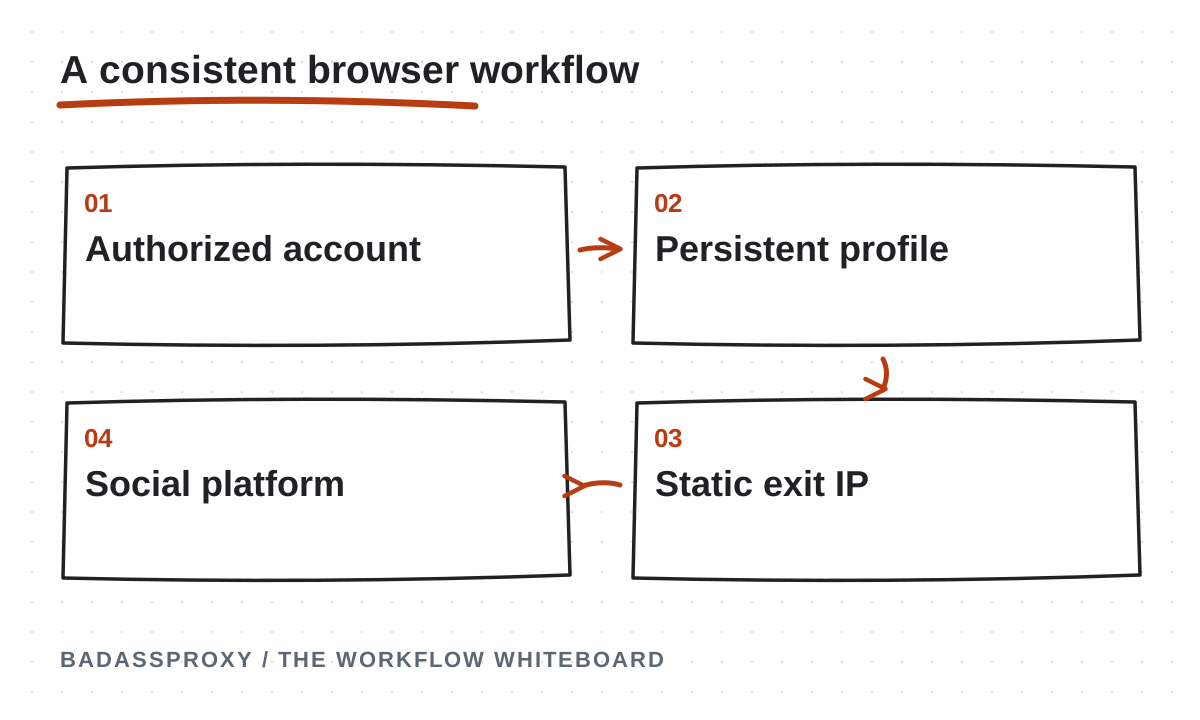
The model is straightforward: authorized account, persistent browser profile, configured static proxy, destination platform. Each layer has a different job. The account supplies permission, the profile keeps browser state, and the proxy supplies the network route. None substitutes for the others.
Before signing in, check that the connection works and shows the address assigned by your provider. Close and reopen the profile, then repeat the check. Test a second underlying network if practical. These checks establish routing behavior; they do not certify how Instagram will assess a login.
For a documented walkthrough, use our dedicated browser profile setup. If you already have reliable access, avoid replacing the whole environment during a deadline. Introduce a justified change at a quiet time and keep a recovery route available.
Prepare recovery before departure
Travel preparation should begin with ownership. Confirm that you can open the connected email account and that its recovery methods still work. Check whether your phone number will receive messages overseas. A travel SIM can supply data without preserving the number attached to your social accounts.
Enable an available two-factor method that fits your travel plans, and store backup codes securely. Keep a recovery option separate from the device most likely to be lost. A password manager helps only if you can also recover that password manager when your phone disappears.
Review unfamiliar sessions before the flight, update your software, and record who can administer important business assets. Our moving abroad checklist turns this preparation into a schedule. These security controls remain valuable whether you buy a proxy or use your usual connection.
Make the first week manageable
On arrival, begin with your familiar device and normal account workflow. Complete legitimate security prompts through the app or a bookmarked official website. Do not follow a direct message claiming an urgent account review requires sending a password or recovery code.
Keep notes about genuine changes: a new SIM, a replacement laptop, a provider outage, or an intentional proxy replacement. Do not record passwords or authentication codes in that log. The purpose is to reconstruct events, not create another sensitive database that the team must protect.
If a challenge appears, pause unrelated experiments. Switching countries repeatedly, clearing storage, and resetting passwords in quick succession can obscure the original problem. Security takes priority when compromise is suspected, but otherwise a measured diagnosis gives you better evidence than a sequence of guesses.
Teams need permissions as well as profiles
A shared connection does not make shared passwords a good access model. Use the platform's available business roles and individual authorization wherever possible. Record the asset owner, publishing lead, backup administrator, and person responsible for recovery. Browser organization should support those roles.
For a remote team, agree how handovers work. One person should know when another operator is making sensitive account changes. A clearly named profile, scheduled renewal reminders, and an access removal checklist prevent practical failures that have nothing to do with a platform detecting travel.
The digital nomad account-security guide covers this operating routine in more detail. Its central principle is simple: a secure account is one its rightful owner can control, recover, and audit, even after a flight cancellation or lost phone.
Know when a proxy is unnecessary
If your personal account works reliably on your regular phone, your recovery methods are sound, and you have no managed browser requirement, introducing a proxy may add cost and another failure point. International travel by itself does not create a universal need for one.
A static route is more compelling when you deliberately need a repeatable browser connection across changing networks. Evaluate the administrative benefit against latency, maintenance, subscription costs, and provider dependence. Start with a small authorized workflow before making it central to your business operations.
Be cautious about claims that a residential address is automatically trusted or that a browser is undetectable. Those statements confuse product categories with platform decisions. Consistency is a feature you can inspect; guaranteed account survival is not a promise a proxy company can validate.
For example, schedule connection testing before a client launch rather than during it. Keep the usual recovery device charged, identify a backup administrator, and allow time to contact support. That small operating buffer makes a technical interruption manageable without requiring assumptions about why the platform reacted.
Build a setup you can explain
Moving to Vietnam should be a life change, not an account-recovery strategy. Prepare ownership and recovery first, identify actual error messages, and keep the working environment understandable. A stable IP and persistent profile can then solve the specific continuity problem they are designed to address.

For a browser workflow that needs a consistent exit address, explore BadAssProxy static residential options. Check the available location, term, and connection requirements before purchase. Pair the service with authorized access and sensible security habits, and measure success by reliable operation rather than promises about avoiding enforcement.
Build a relocation baseline before changing the setup
A baseline is a small record of the environment that currently works. Write down the device, browser profile, applications used for work and the connection route each application follows. Include the date and the person responsible for the account. Keep secrets in their existing protected location; the baseline should refer to them without reproducing them.
Describe the ordinary task you can complete, such as opening the account dashboard or reviewing scheduled content. This is more useful than a vague note that everything works. After the move, the same task provides a practical comparison. If something changes, you can identify which part of the familiar workflow no longer behaves as expected.
Do not interpret a successful baseline as a prediction about future platform decisions. It establishes your own starting point. That distinction matters because a network check, a working session and an account's policy standing are separate observations. Recording them separately prevents a connection improvement from being presented as proof that every account risk has disappeared.
Inventory the applications that matter
List the places where you actually use the account. A desktop browser, a phone app, an approved scheduling tool and a business-management interface may all be part of one working week. Describe the owner and purpose of each. This inventory makes it easier to see whether a proposed proxy configuration covers the relevant task.
For each application, record whether the route is direct, supplied by a device-level service or configured inside the application. If the answer is unknown, treat it as a question to investigate before relying on the setup. A service installed on one device does not automatically describe what every other application does.
Keep the inventory short and maintainable. It should help a colleague understand the normal workflow without revealing credentials. Review it when the team adds an application or changes a publishing process. A clear map of legitimate access is more useful than trying to force every activity through a connection tool simply because the tool is available.
Plan the transition between your old and new phone arrangements
Moving abroad often creates two separate phone questions: how to obtain everyday connectivity and how to retain access to the number already associated with important accounts. Discuss the actual service requirements with the relevant providers before departure. Record what you have confirmed and which part still needs a decision.
Avoid assuming that a new data connection preserves an old recovery method. Review each important account through its official settings and confirm the methods you can legitimately use. If an update is needed, make it while you still control the existing methods and have time to complete any official verification process.
Keep a simple transition checklist with completion dates. Mark a step done only after checking the resulting state, not merely after starting the change. This gives you a clearer picture of readiness when travel becomes busy. It also prevents the phone-number question from being lost among unrelated tasks such as choosing accommodation or setting up an apartment connection.
Rehearse ordinary work without rehearsing risky account changes
A rehearsal can focus on the everyday workflow. Open the intended browser profile, check the configured route and perform a normal authorised reading or management task. Close the profile, reopen it and confirm that you understand what persists. Record any prompts or unexpected differences without repeatedly trying new configurations.
Do not create unnecessary security events merely to make the rehearsal feel comprehensive. You do not need to deliberately lose access, expose recovery information or submit multiple account reviews. The useful question is whether you can operate and explain the planned environment, including where to obtain help when a component fails.
Have a colleague follow the instructions if the workflow belongs to a team. Watch for steps that rely on unspoken knowledge, such as choosing between two similarly named profiles. Improve the naming or documentation before travel. Small ambiguities that are easy to resolve at home can become frustrating when people are working in different time zones.
Use a connection decision worksheet
Write the requirement in ordinary language before comparing product labels. For example, you may need one browser workspace to retain a known exit address while your underlying internet connection changes. That describes a testable operational requirement. It is more specific than asking for a connection that makes an account safe.
Add the application, required protocol, intended region, expected work pattern and person responsible for renewal. Confirm the relevant capabilities against the actual plan you are considering. Keep unresolved questions visible and run a small pilot before making the route central to an important deadline.
Include reasons not to buy. If your current workflow already meets the requirement, another service may introduce maintenance without solving a meaningful problem. A useful worksheet supports both outcomes: choosing an appropriate connection or deciding that the existing arrangement is sufficient. The quality of the decision depends on fit, not on the number of tools in the setup.
Planning example: the first week in a temporary apartment
Consider an illustrative remote worker who arrives with a familiar laptop and a prepared recovery plan. The apartment connection is unreliable during the first evening, so she uses a mobile hotspot. Her documented browser profile is configured to use the same selected proxy route on either underlying network.
Before working, she checks ordinary connectivity and then checks the configured browser route. If the hotspot works but the proxy connection does not, she has a narrower technical question to investigate. She does not treat the failure as evidence that the social account has been disabled, because she has not yet observed an account notice supporting that conclusion.
The example demonstrates an order of investigation rather than a guaranteed result. Establish which layer is failing, retain the information needed for support and avoid changing unrelated account settings while diagnosing a connection. A clear sequence can make a routine technical interruption easier to manage during an otherwise demanding week.
Planning example: an unfamiliar city in a login alert
Imagine that a traveller recognises the device and time in a login alert but does not recognise the displayed city. He checks whether the event matches his own activity and whether the configured network route was in use. He also reviews the account through the genuine application rather than following an unsolicited message.
The location alone does not settle the question. If other details are unfamiliar or account information has changed unexpectedly, he follows the appropriate official security process. If the event appears consistent with his own activity, he records the observation and investigates the route without claiming that the city label proves physical presence.
This example is deliberately cautious about conclusions. A familiar route is useful context, but it is not proof that every event is legitimate. The right response comes from reviewing the event as a whole and using the platform's available security controls when the evidence calls for them.
Planning example: a teammate takes over during travel
A small agency has a publishing deadline while its usual operator is in transit. Before departure, the team confirms the backup operator's legitimate permissions and provides a short handover describing the correct asset, browser workspace and next task. The handover contains configuration references, not exported sessions or recovery codes.
The backup operator follows the normal setup and confirms the intended client before making changes. If access is unavailable, the team uses the named owner and support path. It does not assume that sharing the same proxy automatically gives another person the required business permissions.
The important preparation happened before the flight. The team agreed on ownership, verified the backup role and defined the work that could continue. Connectivity supports the arrangement, but the arrangement itself is organisational. A clear handover reduces dependence on the travelling person's availability without turning account access into an informal exchange of secrets.

Keep the change log useful and small
Record changes that could help explain a later interruption: a new device, an intentional browser-profile replacement, a connection renewal or a changed recovery method. Include the date, the reason and the result of the relevant check. Avoid filling the log with routine activity that nobody will use during investigation.
Distinguish planned changes from unexpected observations. A provider-confirmed address replacement and an unexplained route change are different events. Keep the source of the information clear so a colleague can tell whether a statement came from a service notice, your own test or an assumption that still needs checking.
Review the log after an incident. Remove unnecessary detail from the operating procedure while retaining the evidence needed to understand the event. The aim is a manageable record that helps people reason about changes. It should not become another sensitive archive containing passwords, personal documents or entire browser sessions.
Separate account support from connection support
A connection provider can help investigate the service it supplies. Useful information may include the approximate time, client application, selected connection identifier and sanitised error. Explain whether general internet access works and which connection check failed. This gives support a clearer starting point than a broad report that Instagram is broken.
An account suspension or ownership challenge belongs to the platform's official process. Keep its reference and status in the appropriate record, and involve the legitimate owner. A proxy support conversation cannot replace a review of an enforcement decision or establish that someone is entitled to control a social account.
When both issues exist, track them separately. A repaired connection may allow you to reach the official account process, but it does not prove that the account issue is resolved. Clear separation helps you assess progress accurately and avoids repeatedly changing the network in response to a problem that requires a different owner.
Set realistic expectations for shared workspaces
A browser profile can make a working environment easier to recognise, but the team still needs rules about who uses it and what they may do. Confirm the software's actual collaboration model and use the organisation's approved access process. Avoid assuming that a shared folder or copied profile is an appropriate handover method.
Agree how operators communicate during sensitive changes. A short note that someone is updating a configuration can prevent another colleague from diagnosing the same change as an unexpected failure. Keep the note factual and scoped to the work, without exposing the credential values involved.
Review access when responsibilities change. A former contractor may no longer need a browser-tool role, a platform role or access to connection details. Treat those as separate checks. A complete offboarding process identifies each relevant system and confirms the result rather than assuming that one removed permission covers the entire workflow.
Prepare an alternative way to continue the business
Some work can continue without changing the affected social account. The team may be able to prepare content, review approved assets or handle unrelated customer enquiries while an owner completes recovery. Identify these options before an incident so an access problem does not immediately become pressure to improvise unsafe workarounds.
Keep the alternative within legitimate permissions and the actual business process. A backup administrator should have a verified role, not a promise that credentials will be shared later. A prepared content calendar should contain the material the team is entitled to use and a clear record of what is awaiting approval.
This planning makes the connection less of a single point of operational confusion. It does not eliminate outages or guarantee platform access. It gives the team a way to prioritise work, communicate accurately and avoid making unrelated account changes solely because a deadline is approaching.
Review the first month using observations
After settling into the new location, review the interruptions that actually occurred. Separate local connectivity problems, proxy configuration issues, account prompts and ordinary workflow mistakes. A short incident list with dates and outcomes is more informative than a general impression that travel caused every problem.
Ask which part of the setup helped and which part created unnecessary maintenance. Perhaps the profile naming made handovers easier, while an unused connection added renewal work. Perhaps the most valuable improvement was confirming a recovery method before departure. Keep these conclusions tied to the evidence rather than treating the proxy purchase as the only meaningful change.
Use the review to simplify the next month. Retire unnecessary steps, clarify ownership and update any instructions that were difficult to follow. A stable workflow is one the team can maintain and explain as circumstances change. It does not require preserving every decision made during the first busy days after arrival.
Frequently asked relocation questions
Should I change the account's country information because I bought a proxy?
Use accurate information and follow the platform's own requirements for your account and business situation. A connection product is not an instruction to misstate your location or identity. Keep account-information changes separate from network configuration, and confirm the appropriate process through the official application when a real change is needed.
Can I use the same browser profile on a replacement laptop?
That depends on the software and the organisation's approved transfer process. Review the current documentation and treat stored session data as sensitive. Confirm legitimate access and recovery independently. Do not assume that copying a folder produces an identical or safe environment, and do not transfer profiles through an uncontrolled shared location.
What should I check before renewing a static connection?
Confirm the active product, assigned connection, renewal terms and person responsible for the purchase. Check that the application still needs the service and that the working configuration remains understandable. Record a provider-confirmed change when it affects the route. Renewal should maintain a justified requirement rather than preserve an unused tool indefinitely.
Does a successful connection test mean the account is safe?
It establishes only the behaviour covered by that test. A reachable endpoint or expected exit address does not prove account ownership, policy compliance or future availability. Keep the result in the connection record and continue using the appropriate account-security controls. Clear limits make the test more useful because everyone understands what it actually demonstrates.
How should I handle an interruption during a deadline?
Start by identifying the visible problem and the responsible layer. Use the prepared contact and recovery paths, involve the legitimate owner and communicate the operational impact accurately. Continue independent work where possible. Avoid changing several unrelated settings simply to create the feeling of progress, because that can make the original failure harder to explain.

What information belongs in a travel handover?
Include the authorised assets, working profile names, configuration references, responsible people and agreed next tasks. Explain how to contact the appropriate owner if access fails. Keep passwords, identity documents and recovery codes in their designated protected systems. The handover should tell a colleague how to follow the process without becoming a substitute credential store.
A practical readiness review
Before relying on the setup, ask another authorised person to explain the account owner, the normal working environment and the route used by the relevant application. Ask them to identify the recovery owner and the person responsible for connection renewal. Any uncertainty is a useful signal that the operating document needs improvement.
Check the ordinary workflow once more after making those improvements. Confirm the intended account, the expected connection behaviour and the place where the next action is recorded. Keep the result concise. You are establishing that the process can be followed, not claiming that a successful rehearsal guarantees every future session.
Carry that same approach into the move: understand the requirement, prepare ownership, choose a suitable connection where needed and investigate actual evidence when something changes. The resulting setup should help you do legitimate work more consistently while remaining simple enough to maintain after the excitement of relocation has passed.
A relocation worksheet you can actually maintain
Start with one row for each business asset you are authorised to use. Include the platform, the public account name, its legitimate owner, your assigned role and the normal device. Add the person who can approve an access change. This is an operational inventory, so it should remain useful even if you decide that a proxy or specialist browser is unnecessary. Avoid making the spreadsheet dependent on a particular vendor's terminology.
In a separate column, describe the normal connection in ordinary language. For example, write “managed browser profile using the assigned static endpoint” or “official mobile app using the phone's current connection.” The distinction matters when someone asks why the laptop and phone appear to have different routes. Do not paste the endpoint password into that description. A reference to the approved credential store is enough for someone who already has permission to retrieve it.
Give recovery its own entry. Identify who controls the recovery email, whether the owner can receive the required verification method abroad, and where approved backup information is stored. Use a status such as “owner confirmed access before departure” instead of recording the secret itself. Include a review date so an old confirmation is not mistaken for a current check. When circumstances change, replace the status with a new observation and explain the reason briefly.
Finally, add the next planned change. A new apartment connection, replacement laptop or teammate handover can be prepared without treating it as a crisis. Record which part of the workflow will change and which person will verify the result. The worksheet becomes valuable when it connects a real observation to a responsible next step. It does not need elaborate scoring, speculative risk percentages or a catalogue of every possible travel mishap.
Three decisions to make before buying anything
Is the problem ownership, organisation or connectivity?
If you cannot receive an account's recovery messages, begin with recovery. If several staff members confuse one client's account with another, improve roles and workspace separation. If the relevant browser genuinely needs a consistent exit address across changing networks, evaluate a suitable connection product. These needs can coexist, but each has a different acceptance test. Buying one tool should not be recorded as resolving all three.
Use the symptom to define a small outcome. “The owner can receive the requested code” is an ownership outcome. “The operator opens the correctly labelled client workspace” is an organisation outcome. “The configured browser reports the assigned exit on both approved networks” is a routing outcome. Once those statements are separate, it becomes easier to recognise what a test proves and where another task remains open.
Can the team support the proposed setup?
A workflow maintained by one enthusiastic operator can become fragile when that person is asleep or unavailable. Ask a second authorised colleague to find the setup instructions, identify the correct application and explain the support path. They should not need a password sent through an informal chat to understand the process. If the explanation requires extensive improvisation, simplify the setup before making it part of daily client delivery.
Supportability also includes cost and renewal ownership. Record who receives service notices, who approves renewal and what happens if the service is no longer needed. A small agency does not need a large infrastructure team, but it does need someone accountable for the connection it relies on. Review this arrangement after the move, when temporary travel decisions may otherwise become permanent through habit.
What would make the setup unnecessary?
Define an exit condition as well as a purchase reason. Perhaps the team later moves entirely to native business permissions and a stable office connection. Perhaps the browser application no longer needs a separately managed route. Reassessing the requirement is normal maintenance. Keeping a product because nobody remembers why it was added creates complexity without a corresponding benefit.
If you retire a service, plan the change openly. Confirm the affected application, preserve legitimate account access, remove obsolete configuration and protect any records that still need retention. Record the new normal route so future location alerts can be interpreted in context. Retirement is complete when the working instructions describe the current environment rather than an abandoned arrangement.
Keep the Vietnam setup useful after the move
Relocation advice often stops at the first successful login. The more useful milestone is a routine that still makes sense several weeks later. Review whether the account owner can recover access, whether the intended operator understands the browser arrangement and whether connection support can identify the product in use. Remove notes that turned out to be inaccurate and keep the facts that helped solve an actual problem.
Use the articles linked throughout this guide for specific decisions. The recovery article covers access interruptions, the proxy comparison explains product differences, and the travel checklist organises preparation. You do not need to adopt every technique in every article. Choose the smallest set that supports your authorised work, document it clearly and keep the security controls around it current.
The practical goal is predictable work while living in Vietnam: the right person, the right account, a known device and an understandable connection. A static IP and persistent browser can support that goal when they match a real requirement. Their value comes from how well they fit the wider routine, including ownership, recovery, updates and the people responsible for keeping the business running.