“Non-detect browser” is a marketing term, not a technical guarantee. It usually describes software that manages separate browser profiles and some of the characteristics those profiles present to websites. The phrase suggests invisibility that no provider can reliably promise.
The useful questions are more concrete. Does the software keep client sessions separate? Can you maintain a named workspace between visits? Can you control access and assign a suitable connection? Those are operational features you can inspect without accepting an exaggerated claim about avoiding detection.
AdsPower is one example of profile-management software. This guide explains how profiles, browser signals, and proxies relate, and where their limits belong in an authorized social-media workflow.
Start with the browser profile
A profile is a container for a particular browser environment. It can keep settings and website data separate from another profile, helping a user organize different tasks. The precise storage and isolation behavior depends on the browser and product configuration.
For a social-media manager, that separation can reduce accidental account mix-ups. The workspace for one client's brand stays distinct from another client's workspace. Clear naming also makes it easier to identify which environment should be opened before publishing or changing settings.
An ordinary browser can offer separate profiles too. Specialized software may add management, proxy configuration, or team controls, but it is not automatically necessary for a single personal account. Begin with the organizational problem and choose only the features that solve it.
Cookies and storage provide session continuity
Websites use browser data for several purposes, including session handling and preferences. Cookies are one mechanism; local storage and other storage systems are different mechanisms. The MDN explanation of cookies provides a technical foundation without implying every website implements sessions identically.
Reopening a persistent profile can preserve relevant data, while creating a new profile or clearing storage can require signing in again. That continuity is convenient on a trusted personal device, but it should not be confused with a permanent right to access the account.
The platform can expire or revoke sessions. Security incidents may require you to remove them deliberately. A profile is therefore a managed working environment, not a backup identity that overrides password changes, ownership checks, or the account owner's decision to revoke access.
A browser fingerprint is a collection of signals
Websites can observe characteristics of the browser environment, such as capabilities, language settings, screen information, and aspects of rendering. “Fingerprint” is a broad term for using combinations of such signals to distinguish or relate visits.
The exact signals used by a particular platform and their importance are not fully public. A product that exposes configuration controls cannot honestly guarantee that every relevant signal is hidden. Websites also have account history, behavior, server-side records, and security events beyond browser settings.
Avoid turning this concept into a checklist for impersonation. The legitimate operational goal is a consistent, supported environment for authorized work. Randomly changing characteristics can make troubleshooting harder and may create contradictory settings without providing a benefit you can measure.
Isolation does not prove identity
Keeping two sessions apart does not establish that either account is genuine or that the operator has permission. A browser can organize access, but authorization still comes from the account owner and the platform's supported access model.
Likewise, separating workspaces does not guarantee that a platform cannot associate activity through other information. Billing relationships, account details, connected business assets, and behavior may exist outside the browser environment. Do not promise clients that profile isolation removes every relationship between their accounts.
Use the software for clarity: named workspaces, reduced accidental cross-posting, and controlled access. Those are defensible benefits. Claims about invisibility, guaranteed account survival, or immunity from enforcement replace a useful tool description with something the seller cannot verify.
The proxy controls a different layer
A proxy routes configured traffic through another server. Its exit address is a network property, whereas the profile organizes browser state and settings. Changing the proxy does not automatically create a fresh account, erase server records, or replace the browser's stored session data.
A static proxy can keep the assigned exit consistent across repeated use. A rotating proxy deliberately changes exits according to its service design. Pairing a persistent profile with unnecessary rotation can work against a requirement for a predictable route.
The static versus rotating guide explains that assignment decision. First establish whether a proxy is needed at all, then select the behavior that matches the task. A profile-management product does not make every proxy type appropriate for every account.
What a useful setup looks like
Imagine an agency managing two authorized client brands. Each client has a documented owner, native business permissions, and a named browser workspace. Operators can identify the correct account before posting, and sensitive recovery information stays with the people responsible for ownership.
If one workspace needs a consistent exit, assign a suitable static service and record its renewal responsibility. Test the route before account access. Keep profile backups protected and document who can open the workspace. Nothing in this example requires inventing identities or disguising unauthorized activity.
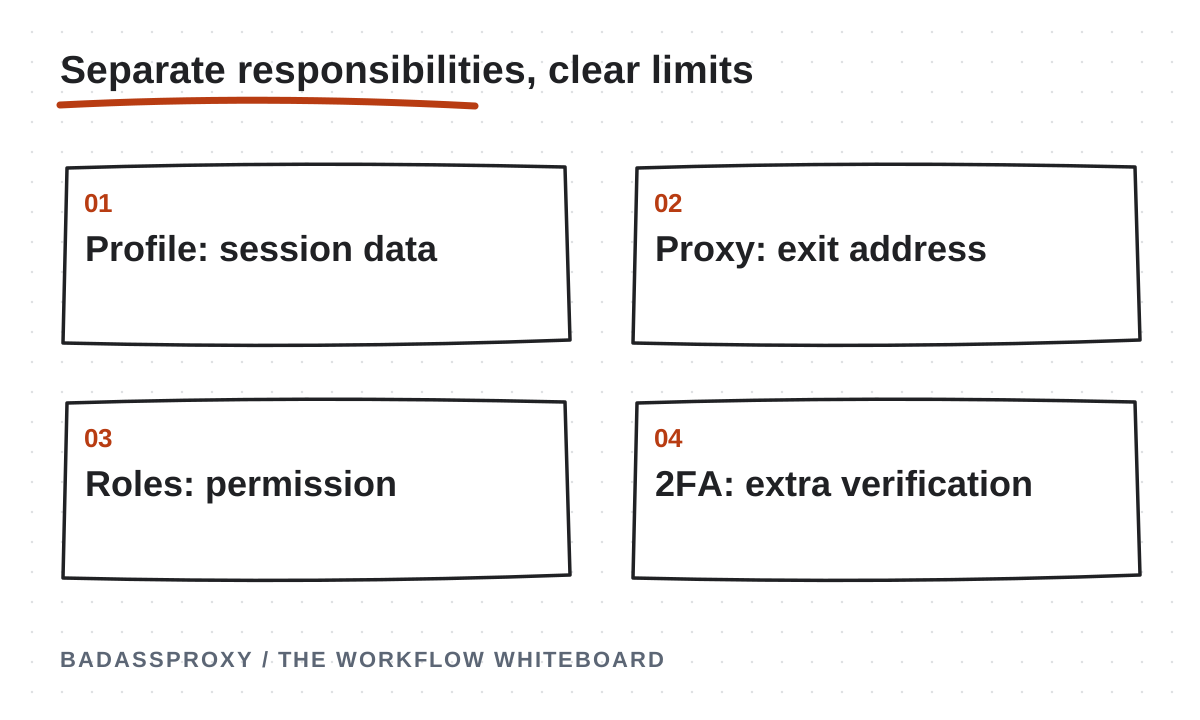
Our Browser and static proxy setup guide turns that model into a practical sequence. The key is separating responsibilities: account permission, browser continuity, connection routing, and recovery each need their own controls.
Treat profile data as sensitive
A profile can contain authenticated sessions and other private browsing information. Sharing an archive may therefore share more access than sending a screenshot. Restrict exports, backups, and cloud storage according to the sensitivity of the accounts inside them.
Review the software provider's security information, access controls, update process, and storage options. Understand whether data is local, synchronized, or transferable and who can retrieve it. Do not assume the word “isolated” means encrypted against every other user of the same computer.
For teams, remove access when work ends and check whether local copies remain. Also review the person's independent platform permissions. A browser workspace and a business role are separate access paths, so revoking only one may leave the other available.
Keep security updates in the routine
Some users mistake continuity for keeping every software version unchanged forever. That creates unnecessary security risk. Use supported versions, install updates, and maintain a record of changes if the workflow is sensitive enough to require troubleshooting evidence.
Extensions deserve similar attention. Add only the tools needed for authorized work, obtain them from trusted sources, and review their permissions. A specialized browser does not neutralize a malicious extension or protect a user who hands over a recovery code.
When compromise is suspected, prioritize account security over preserving a familiar session. Revoke access and rebuild the environment when appropriate. A profile's history is not worth retaining if the device or session is no longer under the owner's control.
Evaluate a product without marketing shortcuts
Ask whether you can name profiles clearly, assign supported proxy settings, test connections, control team access, and recover essential configuration. Check the provider's documentation for your operating system and the features included in the plan you are considering.
Evaluate the effort required to maintain the setup. A solo creator may value simplicity over extensive controls. An agency may need documented handovers and stronger workspace administration. More settings do not automatically produce better security or a more dependable business process.
Use a small authorized trial to inspect practical behavior. Confirm that the correct workspace opens, expected data persists, and operators understand the process. Do not call a trial successful merely because the platform did not issue a challenge during a short observation period.
Consider a mistake that profile organization can prevent. An operator has two client tabs open and uploads a draft to the wrong brand. Separate, clearly named workspaces and an account confirmation step can reduce that confusion without changing any fingerprint setting. The improvement is procedural and visible: the operator can identify the intended client before acting.
Consider a different problem: a former contractor still has a business administrator role. Creating another browser profile does not remove that permission. The owner must review and revoke the platform role through its supported controls. These examples show why a browser should be evaluated by the problem it actually solves. Organization, authorization, and incident response overlap in daily work, but they remain different responsibilities requiring distinct checks and accountable owners.
Keep the limits explicit
Do not use profile isolation to impersonate people, manufacture deceptive engagement, hide unauthorized access, or evade a suspension. Those activities are not made acceptable by changing software or network providers. A platform's rules apply to the activity regardless of the browser used.
If you are relocating, the Vietnam account-stability guide explains the legitimate continuity problem. Prepare recovery channels and familiar access, then introduce tools only when they address a specific operational need.
The honest answer to “What is a non-detect browser?” is profile-management software sold with an overconfident name. Its practical value is organization, separation, and continuity. Pair AdsPower with a BadAssProxy static address when those components fit your authorized workflow, while keeping identity, security, and permissions firmly under the owner's control.

Translate the marketing term into concrete features
“Non-detect browser” is a marketing phrase, not a guarantee that a website cannot recognise a session or evaluate account activity. Begin by asking which concrete features the product provides. Relevant features may include separate browser workspaces, stored session state, supported proxy configuration and team access controls. Evaluate those capabilities individually rather than treating the phrase as a technical promise.
A legitimate business requirement might be keeping client workspaces clearly separated or maintaining an organised browser environment across routine work. Write that purpose down before changing settings. A feature is useful when it supports a defined task and can be maintained by the authorised operator. It should not be presented as a way to remove ownership checks or override platform rules.
Read the application's current documentation for supported behaviour. Product interfaces and features can change, so an old tutorial may not describe the version you are using. Keep the decision tied to the actual product and configuration, and avoid copying claims that have not been verified for your situation.
The rest of the evaluation should focus on ordinary questions: what information is stored, who can access it, how the route is configured, how updates are maintained and how a handover works. Those questions produce a supportable workflow. A promise of invisibility does not answer them.
Understand a profile as a working environment
A browser profile is a way to organise a browser's working state according to the application's design. It can help keep one client's session and settings separate from another workspace. The practical benefit is clearer context: an operator knows which environment they opened and which authorised task belongs there.
Do not confuse that organisation with a separate human identity. The account's legitimate owner and the platform's permissions still determine who may use it. A profile label does not grant authority, and copying a working environment does not transfer ownership. Keep those responsibilities explicit when documenting business use.
Consider the information held inside the environment. Stored sessions and other browser data can be sensitive even when no password is visible on the screen. Limit access to approved people and use supported handling procedures. Avoid treating a profile export as an ordinary document that can be uploaded to any shared drive.
Choose names that identify the legitimate business purpose without exposing secrets. A client reference and role can be more useful than a raw address or an employee nickname. The label should remain understandable when the operator or connection changes, and it should help prevent work from being performed in the wrong account.
Separate session storage from network routing
A profile concerns the browser environment; a proxy concerns the route used by configured traffic. The two can be combined, but they do different jobs. A profile can retain working state while its connection changes, and a static connection can remain assigned while browser data is cleared. Troubleshooting depends on recognising that distinction.
If a website asks you to sign in again, investigate the session and account context rather than assuming the route failed. If an address check shows an unexpected exit, inspect the configuration and provider assignment rather than immediately rebuilding the browser. Each observation should lead to a relevant question.
Document the routing scope. A proxy set inside one profile does not automatically configure another browser or a phone's native application. Perform the connection check inside the intended environment. Otherwise, a perfectly valid observation from the wrong application can be mistaken for a setup failure.
Use the static proxy setup guide when the authorised workspace needs a managed route. Keep its acceptance test narrow: the application uses the expected connection and the legitimate workflow can be performed. That result does not establish invisibility or remove the account's security requirements.
Put browser fingerprint discussions in context
Websites can observe information about a browser and its environment, alongside account activity and other signals available to the service. Discussions of browser fingerprints concern combinations of such observations. They should not be reduced to a promise that changing one setting makes an account unrecognisable or guarantees a particular platform outcome.
For legitimate operations, prioritise a supported, understandable configuration. Do not randomly change settings in an attempt to make every observation unique or identical. Unnecessary changes make the environment harder to maintain and can obscure the cause of a technical problem. Use the application's current documentation for features relevant to your actual task.
Keep browser configuration separate from truthful account information. A tool should not be used as a reason to misstate who owns an account or where a business operates. Native permissions and official verification remain the appropriate mechanisms for establishing authorised access.
When evaluating a vendor claim, ask what evidence supports it and what practical result you can verify. A feature description may explain how a workspace is organised without proving how every external platform will interpret it. Record that limit rather than repeating a broad marketing conclusion in client-facing instructions.
Design a workspace inventory for real people
Start with the legitimate business asset and its owner. Add the approved operator or role, the browser profile label and the normal device. If a managed connection is used, include a non-secret service reference. Keep passwords and recovery codes in the protected system designated for them.
Add a short purpose statement. “Publishing approved material for this client through the assigned role” is more useful than a vague description such as “social account profile.” It helps another authorised person decide whether a requested task belongs in the workspace and whether additional approval is needed.
Record the support and recovery paths separately. The browser vendor supports the application, the connection provider supports its service and the platform handles account verification or enforcement. The account owner remains responsible for ownership-dependent actions. A clear inventory prevents every incident from being sent to whichever provider was purchased most recently.
Review the inventory after staff changes or client handovers. Remove obsolete references and confirm that the current operator can locate the working instructions. An old profile that nobody can explain is an access-management problem even if its connection still works.
Use native roles alongside browser organisation
Where the platform offers suitable business permissions, assign the roles needed for the work. Keep ownership and recovery authority with the legitimate owner. Browser separation can help operators stay organised, but it should complement those permissions rather than become the only control over who uses an asset.
Confirm access before a deadline. The receiving operator should be able to open the required business asset through the approved process, and the owner should know when their participation is needed. Do not assume a profile containing a previous operator's session is an appropriate substitute for a proper role assignment.
Keep the handover factual. Identify completed tasks, pending decisions and the next authorised action. Link to approved content and configuration references. Avoid embedding secrets in task notes, screenshots or shared checklists. The handover should transfer understanding without collapsing every permission boundary into one shared login.
When a person leaves the workflow, remove their access through the relevant platform and supporting tools. Update the inventory and review any shared operational dependencies. A browser workspace may persist for the business, but that does not mean every former operator should retain access to it.
Test separation using harmless observations
Define what separation means for your workflow. You may need clearly labelled workspaces with the intended account context and independently maintained settings. Use a small, relevant check to confirm those properties. Avoid experimenting with live customer actions merely to demonstrate that two windows look different.
Open the intended workspace and confirm the visible account or business asset through the genuine platform. Check the application settings that matter to the task. If a proxy is configured, verify its route inside that profile. Record the result in terms of the feature tested, rather than describing the entire account as undetectable or guaranteed safe.
Check the operator experience as well. Can an authorised colleague tell which workspace to use without guessing? Are similarly named profiles likely to be confused? Clear organisation can prevent ordinary mistakes that a technical connection feature does not address. Adjust naming and instructions when the test reveals ambiguity.
Repeat relevant checks after meaningful changes, such as a new operator, device or connection. There is no need to turn every opening of a browser into a lengthy audit. Keep the process proportionate to the actual dependencies and the consequences of selecting the wrong workspace.

Treat session data as access-sensitive material
An active session can provide access to a business asset even if the operator does not see the underlying password. That makes profile storage, exports and backups important to protect. Use the application's supported mechanisms and the organisation's approved storage controls. Do not casually attach profile data to a general support ticket.
Before transferring a workspace, identify the legitimate recipient and the reason for the transfer. Confirm that the recipient has the required account authority. A technical ability to import a profile is not the same as permission to use the account contained in it. Keep those decisions separate and documented.
Review what is actually included in any export or backup using current product documentation. Avoid assuming that a file is harmless because it has an unfamiliar extension. Share only through the approved process, and handle obsolete copies according to the organisation's retention and access practices.
If a profile or device may have been exposed, involve the account owner and use the relevant security controls. Changing the proxy address alone does not address possible access to stored sessions. The response should match the information and authority that may have been affected.
Keep maintenance compatible with continuity
A stable working environment still needs supported security updates. Follow the application's and operating system's maintained procedures. Plan significant updates when an authorised operator can verify the normal workflow afterward. Consistency means understanding changes, not avoiding maintenance indefinitely.
Record changes that matter to diagnosis: a browser update, replacement device, proxy replacement or revised access role. The note can be brief. Its purpose is to connect a later problem with a known change without requiring the team to remember every action from the previous week.
If an update introduces a problem, identify the affected behaviour and use the vendor's support process. Avoid immediately deleting all profile data or changing unrelated network settings. Preserve useful evidence and legitimate access where appropriate. A measured investigation is more likely to identify the actual issue.
After resolving the problem, update the working instructions. Remove unsupported workarounds that are no longer needed. An environment can become harder to maintain when temporary fixes accumulate without review, even if each one originally addressed a genuine interruption.
Plan a device migration as an access change
A new laptop is more than a place to copy files. Identify the supported migration process, the account owner who may need to participate and the recovery methods that remain available. Prepare the replacement device with current software and approved access to necessary configuration records.
Transfer or recreate the browser workspace only through the supported process. Test the connection before account work, and confirm the intended business asset through the genuine platform. If the platform requests verification, follow the official process rather than treating the prompt as evidence that the migration requires a different address.
Keep the old device secure during the transition. If it is compromised or lost, follow the incident process rather than using it as a trusted migration source. The decision to preserve a session should never override evidence that the environment itself is unsafe to rely on.
When the new arrangement is accepted, update the device inventory and handle access on the old device appropriately. Record the current owner of the workspace and remove obsolete instructions. The migration is complete when legitimate work and recovery are understood in the new environment.
Diagnose profile, connection and account problems separately
A profile problem concerns the browser environment: the wrong workspace, missing expected state or an application error. A connection problem concerns reachability or the configured route. An account problem concerns the platform's credentials, permissions, verification or enforcement. One incident can involve more than one layer, but the categories should remain visible.
Write the symptom before choosing a fix. “This profile cannot complete the proxy check” points toward configuration or service support. “The account requests a code to an unavailable number” points toward ownership recovery. “The operator cannot see the client's asset” may concern business permissions. A broad label such as “browser detected” hides these useful distinctions.
Test the smallest relevant observation. Confirm the profile, basic connectivity or the official notice without repeatedly changing every component. Keep trusted access intact when appropriate. Record one action and one result so the next person can understand what has been established.
Close each layer based on evidence. A working connection check can be completed while a permission task remains open. An account recovery can finish without revealing why a technical error appeared earlier. Honest partial results are more useful than a single vague statement that the entire system is fixed.
An illustrative client-workspace design
A consultant supports two legitimate clients. Each client owns its business assets and grants the consultant an appropriate role. The consultant uses clearly labelled browser workspaces to reduce the chance of performing work in the wrong account. Any managed connection is recorded separately with its purpose and protected credential reference.
Before publishing, the consultant confirms the intended client asset and approved task. The browser arrangement supports that habit, but it does not replace it. Recovery stays with the correct owner, and sensitive account changes require the appropriate authority. The operating note identifies who acts when a verification request appears.
During a later handover, another authorised operator receives the relevant role and working instructions. The team follows supported application procedures rather than sending an unexplained bundle of active session files. The new operator can identify the workspace, support path and next task without guessing.
This is an illustrative organisational use of profiles. It does not establish a universal configuration or claim that the accounts become invisible. The benefit is understandable separation of legitimate work, supported by native permissions and responsible handling of session data.
An illustrative troubleshooting record
An operator reports that one managed browser cannot load a public page. The team confirms the intended profile and discovers that its connection check fails. The account still works through an existing trusted environment, so the operator preserves that access and investigates the supplied endpoint and authentication arrangement.
The provider confirms a service-side change and supplies the appropriate current configuration. The operator updates the intended profile, verifies the route and records the result. The team does not claim that a browser fingerprint caused the issue, because the evidence supports a connection explanation.
If the genuine platform subsequently requests verification, that becomes a separate owner-dependent task. The connection result remains valid within its scope. This prevents a solved technical issue from being reopened repeatedly while the account waits for an official action.
The example shows why precise language matters. A clear record of the layer, observation and result is more useful than an unsupported claim that the browser was detected. Good diagnosis helps the team maintain the real system instead of chasing a marketing abstraction.
Questions about non-detect browsers and profiles
Is a non-detect browser the same as private browsing?
Do not assume the terms describe the same feature. Evaluate the application's actual profile storage and supported behaviour. Private browsing and a managed persistent workspace can serve different purposes. Choose around the legitimate task, and keep account ownership, recovery and session-data handling explicit regardless of the browser mode.

Does a separate profile create a separate legal or platform identity?
No. A browser environment does not establish a person's identity or their authority to use an account. Use accurate information and appropriate platform permissions. Profile organisation can help manage authorised work, but it should not be described as creating ownership or removing verification requirements.
Does every profile need a proxy?
Only add a connection product when it meets a defined requirement. Some legitimate workspaces may not need a separately managed route. If a proxy is used, document its scope, supported configuration and maintenance owner. Avoid making the tool a default purchase for an account problem that concerns recovery or permissions instead.
Can a profile make an account impossible to identify?
No such guarantee follows from profile separation or proxy routing. Platforms can evaluate account activity and information available to them. Use the tools for supported organisational and connection functions, and comply with official verification and account rules. Treat claims of guaranteed invisibility as broader than the features you can actually verify.
What should I do with an unused profile?
Determine whether it contains sensitive session data and whether the associated account or service still has a legitimate purpose. Follow the application's supported handling process and the organisation's retention rules. Update the inventory and remove obsolete permissions or subscriptions where appropriate. Do not leave an unexplained active workspace as a permanent background dependency.
Can I share a profile with a contractor?
First establish the contractor's legitimate role and the platform's approved access arrangement. Then use supported application controls and protected handling procedures where relevant. A profile transfer should not substitute for authorisation. Keep recovery authority with the correct owner and avoid sending sensitive session material through an uncontrolled channel.
How do I choose between a standard browser and a managed-profile tool?
Start with the work. Consider the number of authorised workspaces, the clarity of existing role management, the need for supported routing configuration and the team's ability to maintain the tool. A more complex application is justified only when its concrete features solve a real organisational requirement.
What should a setup review demonstrate?
The authorised operator can identify the correct workspace, the intended application behaves as configured and the account's legitimate permissions and recovery are understood. Record any remaining dependency precisely. A useful review demonstrates those practical outcomes without making unsupported claims about invisibility, account immunity or guaranteed future availability.
Use the terminology that makes the work clearer
Describe the actual feature when explaining the setup to a colleague or client: a separate browser workspace, a persistent session environment or a configured proxy route. Those descriptions connect directly to responsibilities and tests. They also make it easier to identify what failed when an interruption occurs.
Keep the Vietnam workflow overview and static proxy setup guide as references for the relevant operating decisions. The browser is one part of a legitimate account workflow. Clear ownership, accurate permissions, protected recovery and maintainable configuration give that workflow its practical value.
A profile review before an important client task
Start with the visible workspace label and the legitimate business asset. Confirm that the operator has the role required for the task and that the correct owner is available for any ownership-dependent action. This check addresses the practical risk of using the wrong account, which a separate browser environment cannot eliminate without the operator's attention.
Review the configuration only to the extent relevant to the task. If a managed route is required, identify the current service reference and confirm the intended scope. Do not change unrelated settings merely because they are available. A profile with an understandable purpose is easier to support than one containing a collection of unexplained adjustments copied from different tutorials.
Check where sensitive state is handled. The operator should know that an active profile may contain access-sensitive information and should not be shared as an ordinary file. Use supported application controls and approved storage. Keep recovery codes and identity documents outside routine profile notes and troubleshooting screenshots.
Identify the next action if something fails. An application problem, connection error and official account notice need different responses. The review should leave the operator able to describe the symptom and contact the appropriate person. It should not teach them to attribute every interruption to browser detection without evidence.
Review the vocabulary in client communication
Use specific language when describing the service you provide. “We use separate labelled workspaces for authorised client tasks” is a practical statement about organisation. “Our accounts cannot be detected” is a broad claim that profile separation does not establish. Precise wording helps the client understand both the benefit and the responsibilities that remain.
Explain that native permissions, legitimate ownership and usable recovery continue to govern access. A proxy or managed browser can support the operating arrangement, but it does not create authority. This matters during handovers, when a client may otherwise assume the technical operator can complete every verification request independently.
When reporting a successful setup, state the verified result and any remaining dependency. The profile opened, the configured route passed its check and the approved task was available. If owner verification remains pending, say so separately. Clear reporting avoids turning a partial technical success into an unsupported assurance about the account's future.
Keep that same discipline in incident notes and product comparisons. Describing the actual feature, observation and responsible person makes the environment easier to maintain. It also allows the team to change tools later without losing the essential understanding of how legitimate work is organised and recovered.