
Hotel and coffee-shop Wi-Fi can cause frustrating login problems, but the explanation is often more ordinary than an account ban. A captive portal may be unfinished, the connection may drop, or the venue may block a protocol your browser setup needs. Those are connectivity problems before they are security diagnoses.
Public Wi-Fi also deserves careful security habits, without outdated claims that everyone nearby can automatically read modern encrypted passwords. HTTPS has changed the practical risk. The real task is to separate reliability, routing, and account security so you respond to the problem you actually have.
For an important social account, a predictable workflow helps. That can include a trusted hotspot, suitable device protection, and a persistent browser route when required. No single tool makes an unfamiliar network or website trustworthy.
Modern HTTPS changes the picture
The FTC explains that public Wi-Fi is usually safe when connections are encrypted. Modern websites commonly use HTTPS, which protects traffic between your browser and the website when certificate validation succeeds. Public access does not automatically expose everything typed into a legitimate encrypted page.
However, encryption does not tell you that a website's operator is honest. A fake login page can also use HTTPS. Check the actual domain and open social platforms through a trusted bookmark or official app instead of following an unexpected portal link.
Never bypass certificate warnings merely to get online. A venue's network problem is not a good reason to weaken browser verification. If you cannot reach the genuine site securely, stop and use another connection while you investigate the cause.
Captive portals can interrupt the route
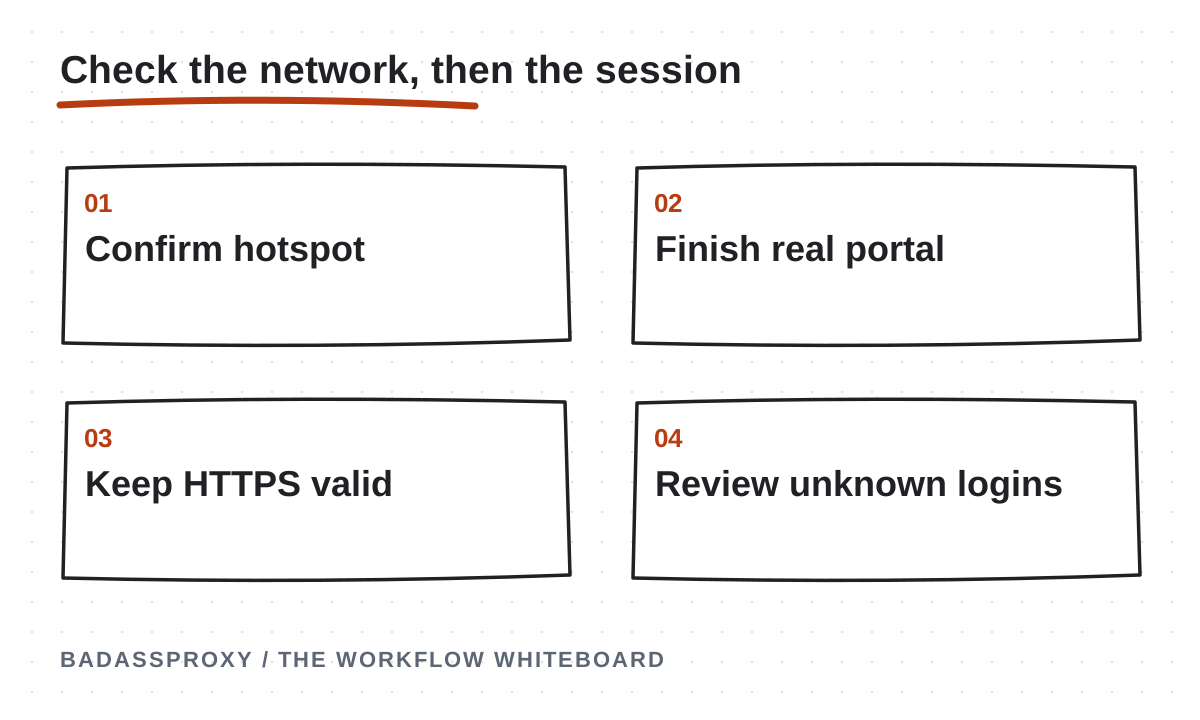
Many hotels require accepting terms or entering a room-related access code before general internet connectivity works. Until that step is complete, websites and proxy clients may time out or display confusing connection errors. The browser is not necessarily failing to authenticate your social account.
Confirm the venue's official network name and portal instructions with staff. Complete the network's legitimate access process, then reopen your intended workflow. Avoid entering a social password or two-factor code into a portal just because it claims those details are needed to unlock Wi-Fi.
If a managed browser route prevents the portal from appearing, consult the venue and your connection tool's instructions. Finish the network access step separately before working on important accounts. Do not make random security-setting changes until something loads.
Shared addresses affect interpretation
A cafe can route many customers through one public address. Hotels may also share gateways or use centralized infrastructure. That means the address seen by an internet service is not a unique identifier for your laptop or proof of your individual activity.
Other users may generate traffic that affects how particular services treat the shared address, but you cannot diagnose Instagram enforcement from that possibility alone. A challenge could concern the session, credentials, account activity, or other factors the platform does not publicly disclose.
Keep the claim narrow: shared networks introduce variables you do not control. Our Vietnam account-stability overview explains why reducing avoidable changes can simplify operations without proving that a specific gateway caused a particular restriction.
Reliability problems can resemble account problems
A weak signal can interrupt an upload or leave a page partially loaded. A venue may disconnect idle devices, change gateways, or require the portal again after a period of time. A busy network may simply struggle with large media files.
Check whether unrelated websites work and whether the device reports internet access. Compare a small page load with a large upload. If the problem affects everything, investigate the network before resetting the social account or clearing all browser data.
Record the exact error and when it appears. “The proxy connection times out before any website opens” suggests a different layer from “Instagram displays an account suspension message.” Clear wording helps the provider or venue respond without guessing at an unrelated account issue.
Fake hotspots and phishing remain concerns
A malicious hotspot can imitate a venue's name, and a deceptive portal can direct visitors to a false login page. Confirming the network name reduces confusion, but it is not a guarantee against every threat. Continue checking destinations and keeping software current.
Be skeptical of urgent messages claiming that your account will close unless you submit a password, authentication code, or payment. Open the genuine app independently and review available account notifications. Do not use a link merely because it appears alongside a familiar logo.
The physical setting matters too. Keep your screen and devices under control, avoid leaving an authenticated laptop unattended, and do not discuss recovery codes where others can hear. A sophisticated network setup does not compensate for handing someone an unlocked session.
Know what a VPN adds
A reputable, correctly configured VPN can encrypt traffic between your device and its endpoint and cover multiple applications. That can be useful when your requirement is broader device traffic protection on an unfamiliar network. Verify its actual scope and any split-tunneling exclusions.
It does not make a phishing site legitimate or prevent every malicious download. The provider also becomes part of your trust arrangement. Evaluate maintenance, support, connection behavior, and the service's privacy information rather than choosing solely because the application displays a shield.
If a steady address matters, check the plan. Many consumer services use shared exits that can change, while some offer dedicated addresses. Our VPN versus static proxy comparison separates encryption coverage from IP assignment so you can choose deliberately.
Know what a browser proxy adds
A static proxy can give one configured browser workflow a consistent exit even as you change underlying networks. That can simplify troubleshooting and make a managed profile's route repeatable. It cannot repair a broken hotel connection or supply encryption that the chosen protocol lacks.
An AdsPower profile may use a proxy while another browser or native app connects directly. Document that boundary. Do not tell a teammate that “the laptop is protected by the proxy” when only one application is configured to use it.
Test the assigned exit before important work and after a network change when needed. Keep proxy credentials private and monitor renewal. If the route fails, diagnose the connection before switching to multiple new endpoints that make the original problem harder to reproduce.
Use a practical arrival routine
When you begin work at a new venue, confirm the network, complete the legitimate portal, and check ordinary browsing. Open your usual authorized workspace and verify that any required connection tool is working. This takes less effort than recovering from improvised settings later.
For sensitive administration, use a connection you understand and can keep stable long enough to finish. A personal hotspot may be more predictable than a congested venue network, although it still requires a secured device and legitimate websites. Convenience and security are separate judgments.
Keep normal publishing work distinct from major account changes. Unless an incident requires immediate action, avoid replacing recovery methods while simultaneously diagnosing a new laptop, a new network, and a proxy failure. Change sequencing makes the outcome easier to verify.
Respond correctly when something looks wrong
If you see a certificate warning or suspicious portal, disconnect and move to a trusted route. If account activity is unfamiliar, review sessions and use official security controls. Secure the connected email account as well when compromise is possible.
An unexpected city label needs more context. Compare the device, time, and activity before deciding what happened. The travel login-location guide explains why carrier routing, shared gateways, and geolocation estimates can produce a surprising location without proving intrusion.
If an actual suspension notice appears, follow the platform's review instructions. Changing Wi-Fi or buying another proxy will not reverse enforcement. Keep evidence and use the right support channel rather than assuming that the venue must be responsible because you noticed the issue there.
Consider an example: the browser worked yesterday, but every page times out after breakfast at a new hotel. Check the venue portal and basic connectivity before changing the account password. If completing the legitimate portal restores neutral websites and the configured proxy, the evidence points toward network access rather than account enforcement. Record the result and continue cautiously. If only the social account still fails, read its message separately instead of treating the resolved Wi-Fi problem as the explanation for every remaining symptom.
Build habits that travel well
Enable two-factor authentication, maintain recovery access, and update your devices before the trip. Follow the digital nomad security routine and save the pre-travel checklist while your usual recovery channels still work.
Public Wi-Fi is neither an automatic account-ban trigger nor a reason to abandon basic caution. It is a network you understand less well than your own. Treat reliability, encryption, website authenticity, and account ownership as separate questions and choose tools that answer each one honestly.
When a browser workspace needs a persistent exit, a static proxy can provide that specific component. Keep its role explicit, preserve the wider security routine, and measure success by dependable authorized access rather than a promise that every hotel network becomes risk-free.
Diagnose the interruption before changing the account
Public Wi-Fi can introduce several ordinary points of failure: joining the wrong network, an unfinished access portal, weak local connectivity or a route that does not support the configured application. Start by identifying where the process stops. A browser that cannot load a public page has not demonstrated that Instagram has disabled the account.
Record the visible symptom in plain language. “The Wi-Fi connection is active, but the browser redirects to the hotel's access page” is different from “Instagram requests a verification code.” A stalled upload is different from an unexpected password change. The clearer the description, the easier it is to choose the next relevant check.
Preserve useful trusted access while investigating. If the account works on a secure phone, do not sign out merely to reproduce the laptop's failure. Check the failing environment first. A working device may help the owner review official notices or complete legitimate recovery, so avoid unnecessary disruption.
Change one relevant condition at a time. Complete the legitimate network portal, confirm ordinary reachability or compare an approved alternative connection. Record the result. Rapidly changing passwords, browser profiles and proxy locations together makes it harder to identify which layer was responsible for the original interruption.
Confirm the network you intend to use
Ask the venue through an appropriate trusted channel which network is intended for guests or members. Similar names can be confusing, especially in crowded buildings. Confirm the connection process before entering sensitive information. Do not assume that the strongest signal or the most familiar-looking name identifies the correct network.
Read the network's access instructions carefully. A legitimate venue portal may require an agreed access code or other venue-specific information, but that does not make an unrelated request for your social account password appropriate. If the process appears unexpected, pause and clarify it with the venue instead of treating any branded page as trustworthy.
Keep the destination in view when a portal redirects the browser. A page claiming that your Instagram account must be verified to restore internet access is not the same as an ownership prompt inside the genuine platform. Navigate to the official application or type the known address yourself when checking account status.
Once the network is connected, verify an ordinary public page before returning to important work. If the network still fails, record that as a connectivity issue. An accurate diagnosis can prevent unnecessary account changes and a wasted purchase of a different routing product when the actual problem is local access.
Understand what HTTPS contributes
The FTC's public Wi-Fi guidance explains why encrypted websites have changed the practical risk of using public networks. HTTPS protects the connection to the website, but a deceptive website can also use HTTPS. The presence of encryption does not establish that the destination is the business you intended to visit.
Keep certificate validation intact. If the browser reports a certificate problem, do not bypass the warning to enter account credentials. Investigate the network and destination instead. A VPN or proxy is not a reason to ignore a warning, and an unfamiliar portal should not persuade you to install a trusted certificate merely to continue social-account work.
Check the actual destination before entering sensitive information. A copied logo, familiar colour scheme or urgent message can look convincing without identifying the genuine platform. Use the official application or a known address for account-security actions. Keep verification codes within the legitimate process you initiated.
Treat HTTPS as one part of the environment, alongside device security, genuine destinations and usable recovery. This avoids two misleading extremes: assuming public Wi-Fi automatically exposes every password, or assuming an encrypted connection makes every page and action safe. A precise understanding helps you choose proportionate precautions.
Separate local-network access from the browser route
Your device first needs a usable connection to the internet. A browser proxy or VPN then introduces its own configuration and service dependencies. If the local network is not working, changing a social account password will not repair it. If the local connection works but the configured service does not, investigate that service separately.
For a browser proxy, confirm the intended profile and the provider-supplied protocol, endpoint and authentication arrangement. Run an appropriate connection check before account work. A different browser may use a different route, so perform the observation in the environment whose behaviour you are trying to understand.
For a VPN, review the actual application coverage and relevant settings using the provider's current documentation. Do not assume that a connected indicator proves every application follows the same route. If your requirement includes a stable address, verify assignment behaviour independently of the coverage check.
Document the scope in the travel note. A phone's native app, a managed browser and another desktop application may have different paths. The VPN and static proxy comparison explains the distinction. Clear scope makes later alerts easier to interpret without treating every difference as an account incident.
Use a personal hotspot as a comparison carefully
An approved personal hotspot can provide a useful alternative when a venue connection is unavailable or difficult to diagnose. Check that it is practical for the task and your own service arrangement. Do not assume unlimited capacity, identical performance or the same observed route as the venue network.
Keep the comparison focused. Use the same device and application where possible, and record whether the original connectivity problem changes. An ordinary public-page check can establish basic reachability without repeated sensitive account actions. If the platform subsequently requests verification, treat that as an account process rather than continuing random network experiments.
Record the hotspot's role in the fallback plan. Explain which tasks it is intended to support and who maintains the device or service. A fallback is more useful when it has been tested before a deadline. A phone with an unknown battery state or inaccessible service account may not be dependable when it is suddenly needed.
After the immediate problem is resolved, decide which connection the workflow should use and update the record if necessary. Temporary arrangements often become permanent through habit. Keep the intended route understandable so a colleague can distinguish the current setup from an abandoned troubleshooting step.
Investigate slow uploads without inventing an account restriction
A slow or interrupted upload can result from several parts of the path. Start with the actual task, file and connection conditions. Record whether ordinary browsing works and whether the application displays a specific error. Avoid describing every delayed upload as a ban or assuming a new IP address is the only possible solution.
Use a proportionate comparison. If appropriate, retry the legitimate task under an approved alternative connection or at a more suitable time, while keeping other conditions as consistent as practical. Do not generate excessive traffic merely to benchmark the venue. The goal is to understand whether the connection can support the work you actually need to perform.
Consider the operational fallback. Preparing captions, reviewing creative material or organising approved assets can continue independently while the upload path is unavailable. Communicate the impact on the publishing schedule honestly. Do not promise a precise completion time based on a single successful test when the environment remains unreliable.
If the application gives an account or content notice, read it separately from the performance observation. A network problem does not explain every platform message, and a platform restriction cannot be diagnosed from speed alone. Keep the connection investigation and the account task distinct enough that each has a clear next action.
Handle captive portals without exposing account access
A captive portal is part of the network's access process, not the social platform's recovery process. Confirm the venue's expected instructions and complete only the legitimate access steps. If the portal is confusing or repeatedly redirects, ask the venue for assistance rather than entering unrelated credentials into whatever page appears.
Keep sensitive account work paused until ordinary connectivity is established. Opening several sign-in pages while the network is still redirecting can make the situation harder to understand. Once access works, navigate directly to the genuine platform and review the account there. Do not use an unexpected portal link as the starting point for recovery.

If the portal asks for a software installation or certificate change you did not expect, clarify the requirement through an appropriate trusted channel. Do not treat a branded page as sufficient evidence that the action is necessary. Use an approved alternative connection if the venue process cannot be understood and the task cannot wait.
Record a recurring portal issue in the travel notes when it affects the workflow. Include the network, device and symptom without storing personal access details in a general document. The note should help the next authorised operator identify the problem quickly and choose the relevant support path.
Protect the physical workspace as well as the connection
A secure connection cannot prevent someone from using an unattended logged-in device. Keep laptops and phones under appropriate physical control, and lock them when stepping away. Be conscious of the information visible on the screen in a shared space. Client messages, recovery details and private business records deserve attention even when the network itself is working normally.
Avoid using shared venue computers for sensitive account administration. A familiar browser window does not establish the state of the device or its stored data. Use a trusted device and approved access process for important account work. If you must change your normal working arrangement, assess the actual requirement and involve the responsible owner rather than improvising under pressure.
Manage files and screenshots deliberately. A troubleshooting image may contain an account identifier, private message or authentication detail outside the area you meant to capture. Review it before sharing and use the approved evidence location. A small amount of care can prevent an ordinary support request from exposing unrelated client information.
Keep the daily routine simple: identify the workspace, confirm the intended account, perform the authorised task and secure the device when finished. These habits complement connection tools. They address the ordinary human errors that a different network route cannot detect or prevent.
An illustrative hotel-network interruption
A traveler opens a laptop in a hotel and finds that Instagram will not load. The phone still has legitimate access through mobile data. The traveler checks an ordinary public page on the laptop and sees the hotel's access portal. The first task is to complete the genuine venue connection process, not to reset the social account password.
After confirming the network instructions with the hotel, the traveler completes the portal and verifies basic reachability. If a managed browser proxy is part of the workflow, they then test that connection inside the correct profile. Each result is recorded at its own layer: local network, configured route and account access.
If the genuine platform later asks for verification, the owner follows the official process. The successful network repair does not remove that responsibility. Likewise, a working phone session is preserved appropriately rather than signed out merely to make both devices display the same prompt.
This illustrative scenario shows why a short diagnostic sequence matters. It can identify a routine venue-access problem without creating unnecessary account changes. It does not imply that every hotel issue is a captive portal or that every later alert is harmless. The actual message still determines the response.
An illustrative suspicious-page incident
Consider a café connection that opens a page claiming a social account must be verified to restore Wi-Fi. The page asks for the account password and a verification code. The owner does not treat the request as legitimate merely because the page contains a familiar logo or an encrypted connection indicator.
The owner stops, confirms the venue's intended access process and checks the account separately through the genuine application on a trusted connection. If sensitive information was already entered into the suspicious page, the owner follows the platform's security or recovery process and secures the associated recovery channels. The response addresses the actual exposure.
The incident note records the observed page and actions taken without distributing the entered secrets. An authorised colleague can help maintain independent business work while the owner resolves the account-security task. No connection provider is asked to reverse an account decision or supply an ownership shortcut.
The scenario is illustrative rather than a report about a particular venue. Its lesson concerns destination verification and recovery handling. A routing product can change a network path, but it cannot make an unrelated page the genuine platform or establish that the person requesting a code is authorised to receive it.
An illustrative coworking handover
A remote team uses a coworking space during a short project. Each operator has an approved role and a clearly labelled workspace. The team confirms the venue network and documents which browser profiles use a managed route. Recovery remains with the legitimate account owners, and the handover notes contain references rather than secret values.
When one operator reports a different login location, the team compares the alert's time, device and activity with the authorised task. They also check the relevant application route. If the event fits known activity, they record that context. If it remains unexplained, the owner uses the platform's security controls rather than assuming the shared workplace makes it legitimate.
A later connection interruption is handled through the venue and provider support paths as appropriate. The team continues independent work and records the current dependency. They do not all attempt account recovery at once or circulate one session export as a workaround for unclear permissions.
The example demonstrates how a shared workspace can remain understandable. The useful controls are clear ownership, appropriate roles, known devices and documented routing scope. None depends on claiming that a public network is always dangerous or that a particular proxy makes every activity safe.
Prepare a support note that identifies the right problem
For a venue issue, describe the network, device, access stage and visible error. State whether ordinary public pages are reachable. The venue does not need the social account password to investigate Wi-Fi access. Keep the request focused on the service it controls.
For a proxy or VPN issue, identify the purchased product, application, non-secret configuration reference and observed failure. Include the relevant local-network context. A provider can investigate its service more effectively when it knows whether the device has basic internet access and which application is failing.
For an account notice, use the platform's genuine process and retain the exact wording. State whether the legitimate owner still controls recovery methods and whether another trusted device remains accessible. Keep sensitive verification material within the official submission process where required.
After a response, verify the particular outcome and update the working note. If the network works but an account task remains unresolved, say so. Clear boundaries help the team recognise progress without prematurely declaring that every part of the incident has been fixed.
Questions about Instagram on public Wi-Fi
Does public Wi-Fi automatically expose my password?
Avoid that blanket assumption. Valid HTTPS protects the connection to the destination, while phishing, device compromise and other issues require separate attention. Confirm the genuine platform, keep certificate validation intact and protect recovery information. Understanding the specific risk is more useful than assuming every public network behaves the same way.
Should I always use a VPN in a café?
Choose a service around your actual coverage and security requirements, and verify its configuration. A VPN does not make every website trustworthy or replace the account owner's recovery methods. Keep the normal device and destination checks in place. If the work needs only a managed browser route, compare that requirement with the available supported options.
Will a static proxy solve a hotel's captive portal?
A proxy does not remove the need for a usable underlying network connection. Complete the venue's legitimate access process and confirm basic reachability first. Then test the configured browser route if it is part of your workflow. Keep the two steps separate so a local access problem is not confused with a provider or account issue.
Why does my phone work while the laptop fails?
They may use different networks, applications or routing settings. Compare those conditions before changing account information. Preserve useful trusted access on the working device when appropriate. A phone on mobile data and a browser using hotel Wi-Fi plus a proxy are not equivalent tests of one connection.
Is a certificate warning just a Wi-Fi inconvenience?
Treat it as a reason to stop entering sensitive information and investigate. Do not bypass the warning merely to complete a task. Confirm the network and destination through trusted channels, and use an approved alternative connection if needed. A VPN or proxy does not justify ignoring a certificate problem.
What should I do after an unexpected verification prompt?
Check that the prompt is inside the genuine platform and that you initiated the action. Use the official method available to the legitimate owner. If the requested recovery channel is unavailable, follow the appropriate account process. Repeatedly changing networks is not a substitute for proving ownership.
Can I keep preparing work while access is unavailable?
Yes, when the tasks are independent and authorised. Draft content, organise approved assets or update the internal schedule without attempting restricted account actions. Communicate what is waiting and who is responsible for the next step. Continuing useful work does not mean the account or connection issue has already been resolved.
What should I check before the next trip?
Confirm recovery access, trusted devices, the intended browser configuration and a practical fallback connection. Test the ordinary workflow before departure and record the result. Use the moving-abroad checklist to organise those dependencies. Preparation makes interruptions easier to diagnose without promising that every network or account session will behave identically.
Keep a reliable public-workspace routine
The most useful routine is short enough to follow under travel conditions. Confirm the venue network, establish ordinary connectivity, open the intended workspace and use the genuine platform. Keep devices controlled and recovery information protected. If something changes, record the actual symptom before selecting a response.
Maintain separate responsibility for the venue connection, any configured routing service and the social account itself. A clear record should identify which layer is working and which remains unresolved. This makes support requests more accurate and prevents unnecessary changes to unrelated parts of the environment.
Return to the digital nomad security guide for the broader ownership and device plan. Public-network preparation is one part of that routine. Its purpose is to support legitimate work with understandable checks, proportionate precautions and a clear path when access is interrupted.
A short connection log for recurring venue problems
If the same public workspace repeatedly interrupts work, keep a small log rather than relying on memory. Record the venue network, device, application, approximate time and first visible failure. Note whether a legitimate access portal was completed and whether ordinary public pages were reachable. Keep social-account secrets and unrelated client information out of the record.
Add the configured route only when it is relevant. A browser proxy, VPN or direct connection can change which support path needs investigation. State where the observation was made, because another browser may follow a different route. The log should make the scope clear without requiring the reader to infer it from an unlabeled screenshot.
Record the action that produced a verified change. Completing a portal, correcting a supported configuration or moving to an approved alternative network may each have a different effect. Avoid declaring a universal cause after one successful retry. The log can show a useful pattern while preserving the limits of a small number of observations.
Use the record to make a practical work decision. A venue may be suitable for drafting content but inconvenient for a time-sensitive upload or an owner-dependent administrative task. Schedule important work where you can complete it accurately. This is a decision about observed reliability and the task's needs, not a blanket claim that every public network is unsuitable.
Keep account security separate from venue reputation
A familiar café or hotel can provide a convenient workspace, but familiarity does not establish the legitimacy of every account prompt you see there. Continue using the genuine platform for verification and recovery. Likewise, an unfamiliar venue does not by itself prove that an account alert represents compromise. Review the actual device, time and activity.
If suspicious account activity appears, follow the official security process from a trusted environment and secure the supporting recovery channels. The venue's Wi-Fi support and the account's ownership process have different responsibilities. A helpful network administrator does not need access to your social-account password or recovery codes.
After the issue is addressed, update only the parts of the operating routine that the evidence supports. You may need a better fallback connection, clearer workspace instructions or stronger recovery preparation. Avoid accumulating unrelated tools after every interruption. A small, understood setup and a precise diagnostic record are easier to maintain than a collection of changes whose original purpose has been forgotten.
Keep these notes available to authorised teammates who use the same workflow. Shared understanding can save repeated troubleshooting while still allowing each new account alert to be assessed on its own evidence.